


Budgets 2026 – 2027
North Hambleton District Scouts budgets
The Finance Sub-committee has set budgets for the next 12 months. Here is what a district budget is, and what it is not.
Budgets set for the year ahead
The Finance Sub-committee has set budgets for various teams and events for the next 12 months.
A budget is an estimate
It helps the District Trustees plan their activities and expected costs. It is a planning figure, not a promise.
This is the first year
Budgets may be too high, or too low. Tell the Treasurer if yours looks wrong for what your role actually needs.
Not approval to spend
A budget is not approval to spend all the money. Each item of expenditure still needs to be planned and justified.
Expenses procedures
Three types of expenses
How your spending is handled depends on what you are doing in the District. Find your role below before you spend or claim.
You have a role in the District
You have a budget to manage your activities in support of other groups and individuals across the District.
- This is an estimated, maximum expenditure for the whole year.
- It covers travel, administration costs (printing, pens, paper), hire of facilities for meetings, and basic refreshments such as tea and biscuits.
- All expenditure should be cost effective and kept to a minimum.
- Your manager approves all expense claims.
- You need to provide receipts for all expenditure.
- You need to keep track of what you have spent against your allocated budget.
- This is not the budget for events where attendees pay a fee, such as camps or trips. Those are managed separately and should be self funding.
You are organising a District event
Consider every aspect of the event and make choices about venue, refreshments, activities and income. These events should be self funding.
- Set a fee for attendees that lets you make the event enjoyable, without it being so expensive that no one will attend.
- Estimate the number of attendees so you know how much you can spend.
- Maximum numbers: how many members are there in that section or group?
- Overnight stay: how many can you accommodate?
- How many meals will you need? Who will cater? What facilities do you have or need?
- Identify a suitable location and get quotes for food and activities.
- Events rarely balance exactly, so taking payments in advance reduces the uncertainty.
- If there are not enough attendees, you may need to cancel.
- Where invoices come directly from suppliers, venues or caterers, get approval before you make the booking.
- Provide receipts for all expenditure; your manager approves claims that are valid.
- Keep track of what you have spent against your allocated budget.
You are helping at a District event
Your main expenditure will be transport, and the event organiser approves every claim.
- Check with the organiser that your transport is covered. If your name is not on the list of helpers, you will not be able to claim.
- If you are asked to buy refreshments, make sure you are given a budget to work with first, so you do not put the event over budget.
- Submit your expense claims online, in the usual way.
- The event organiser will need to approve all claims.
Claims
How to make an expenses claim
Plan it, spend it, claim it. Every claim needs a receipt and an approval before the Treasurer can pay it.
Complete the online form
Fill in the online expenses form on the District web page.
Upload your receipts
Attach the receipt or receipts for everything you are claiming.
Send it to your manager
Send the claim to your manager, or to the person holding the budget for that particular event.
Approved and forwarded
Your claim should be approved and forwarded to the Treasurer.
Check you have been paid
Check that you have received your payment, usually within 4 to 10 days.
Keep track of your expenditure
Log spending against your budget as you go, so your claims always match your records and nothing is forgotten at the end of the year.
Open the trackerDeadlines for accounts
Do not leave claims until the end of the year. Send them in as you go, and check with the Treasurer for the closing date of the district accounts.
Step 01
Creating a Budget
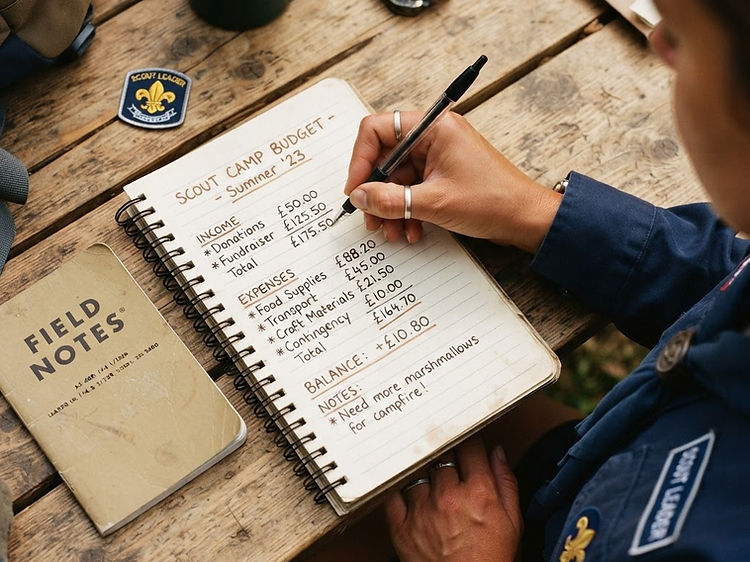
A budget is a plan for your money. Before a camp or fundraiser, you list what money you expect to come in and what you expect to spend, so nothing is left to guesswork.
Set your goal
Decide what the budget is for, a summer camp, a fundraising stall, or a badge project. A clear goal tells you what expenses matter and which can wait.
List your income
Write down every source of money coming in: subs, fundraising, grants, or parent contributions. Be realistic rather than hopeful; underestimating income is safer than overestimating it.
List your expenses
Split costs into fixed (site fees, transport) and variable (food, activities). Group them so you can see the big items at a glance.
Balance the two
Subtract expenses from income. If the number is negative, trim variable costs or plan extra fundraising before you commit. A balanced budget is one that could actually happen.

Step 02
Managing a Budget
Creating the plan is the easy part. Managing it means keeping the plan alive as real money moves, adjusting when things change, and making decisions before small gaps become big ones.
Keep money separate
Hold scout funds in a dedicated account or float, never mixed with personal money. Clear separation makes it obvious what belongs to the group and what doesn't.
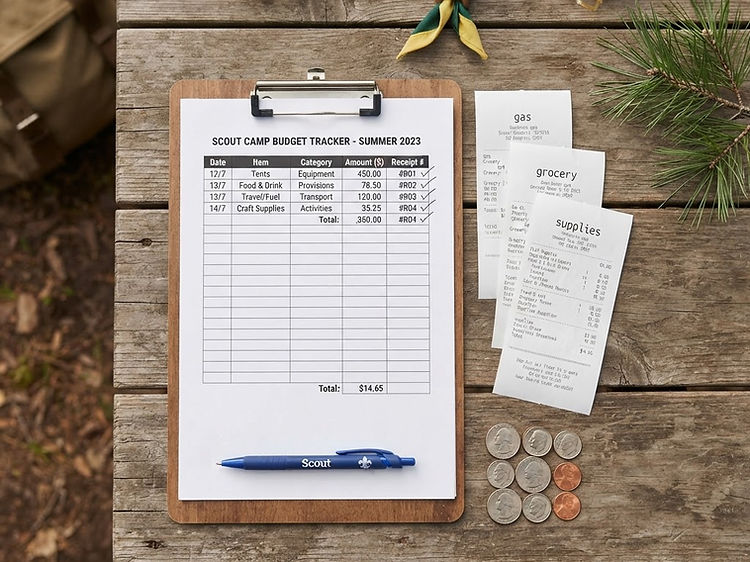
Record every transaction
Note each payment and receipt, with the date, amount, and purpose. A simple notebook or spreadsheet is enough, the habit matters more than the tool.
Check in regularly
Review the budget together at set points, weekly during a camp, monthly through the year. Compare what you planned to spend against what you actually spent.
Adjust, don't abandon
When costs shift, update the budget rather than ignoring it. Move money between categories, agree the change as a group, and keep the plan honest.

Step 03
Tracking a Budget
Tracking is how you know whether the plan is working. The aim is a clear, honest picture of where the money has gone and what is left, without surprises at the end.
Pick a simple system
A spreadsheet, a printed ledger, or a notebook all work. Choose one the whole group can use and stick with it, consistency beats sophistication.
Log as you go
Record spending the day it happens, not from memory at the end. Fresh receipts are accurate; recalled numbers drift.
Compare to the plan
Each review, set actual spending next to the budgeted amount for every category. The gap between the two is the only number that tells you the truth.
Keep receipts and a trail
Store receipts and a short note for each transaction. If anyone asks where the money went, you can show it in minutes, not days.


Editable diagram
The budget flow
A visual map of the whole process. Drag any step to rearrange it, and double-click a box to rename it. Your layout is saved in this browser.
Drag to rearrange · double-click to rename
Quick Tips
Habits that keep it simple
Round in your favour
Round income down and expenses up. The small cushion covers the costs you forgot to plan for.
Make it a group habit
Involve the whole unit in reviews. Shared awareness keeps everyone honest and engaged.
Keep a small reserve
Hold back roughly 10% for the unexpected, a broken tent, a missed transport booking, a weather change.
Learn from each budget
After an event, note what you over- and under-spent. Next time's budget gets sharper because of it.
Your tools
Put the procedures into practice
Expense history
Scroll back through every entry logged, month by month.
OpenBudget categories
Define the spending categories and set their 2026–27 targets.
OpenSubmit a claim
Claim back your spending with a description, category and receipts.
OpenDistrict overview
See at a glance how spend is tracking against the planned budget.
OpenThank you
Questions about a budget or a claim?
Thank you for keeping District spending clear and well planned. Speak to the Treasurer if your budget or claim is not what you expected.